Union Budget 2026 Updates
- Time limit to revise Income Tax Returns extended till 31st March (earlier 31st December).
- A nominal fee will apply for revisions after the original deadline.
-
ITR filing due dates clarified:
- ITR-1 and ITR-2 → 31st July
- Non-audit business cases and trusts → 31st August
- Taxpayers are now allowed to update their returns even after reassessment proceedings have started, by paying an additional 10% tax.
What is Income Tax Return (ITR)?
An Income Tax Return (ITR) is a form filed by taxpayers with the Indian Income Tax Department to report their income, deductions, taxes paid, and tax liability for a financial year. Filing an ITR helps individuals and businesses declare their earnings, claim refunds, carry forward losses, and stay compliant with income tax laws.
Individuals are required to pay income tax on their salary or wages, as well as on other forms of income such as interest, dividends, rental income, business profits, and capital gains. Corporations are also required to pay income tax on their profits.
ITR contains all the details of incomes and tax-saving investments an individual does in a particular financial year. The tax department has notified 7 types of ITR forms i.e. ITR 1, ITR 2, ITR 3, ITR 4, ITR 5, ITR 6, ITR 7 for filing Income Tax returns (Forms are relevant for individuals, companies, firms, etc.).

What are the Benefits of Filing an Income Tax Return?
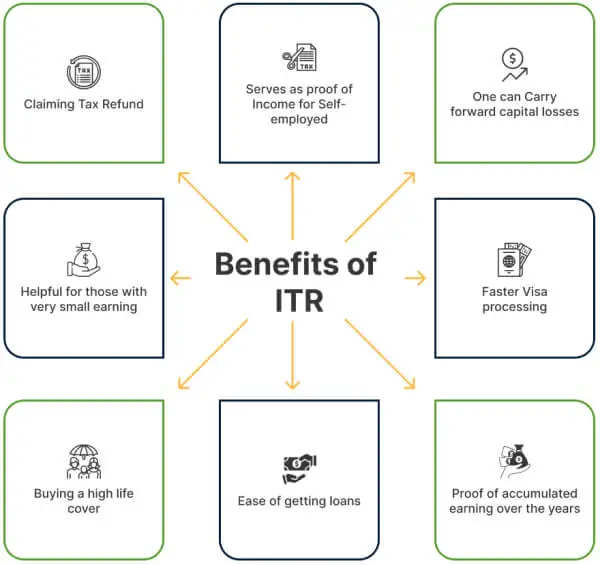
In India, there is a general practice that if you are a citizen with a gross income that exceeds the basic tax exemption limit, i.e., 2,50,000 (old regime) & Rs.4,00,000 (new regime), subject to certain conditions, you must file an Income Tax Return (ITR). If your income doesn’t exceed the basic exemption limit during the year, you’re not legally bound to file your return. But it’s still recommended that you file your return because of the benefits that come with filing an income tax return:
Accidental Claims Income tax returns can be used as evidence to help determine the income of an accident victim when calculating accident claim amounts. However, the specific formula used and other factors such as the severity of the injury, medical expenses, and loss of earning capacity will also be considered.
Proof of Income/Proof of Net worthITR serves as a comprehensive record of an individual's income, deductions, and tax liabilities, making it a reliable proof of income.
Refund You can claim a refund of the amount you have paid in excess or deducted excessively in the form of TDS. There is no bigger joy than getting back your money from the Income Tax Department.
Eligibility in Loan Application Income Tax Returns for the last three years are one of the basic documents required for loans. This helps banks in judging your payback capacity.
Carry forward capital losses If, in a financial year, you have incurred capital losses, then you can carry forward them and settle them in the future.
Obtaining Visa For traveling abroad, foreign consulates of many countries ask you to furnish the last 3 years’ income tax returns or the current year’s income tax return. The absence of any return can reduce your chances of getting a visa, especially under the visitor, investor, and work permit categories.
Carry forward of losses Want to claim last year’s business loss? File your income tax return, and you’re all set for it.
For Startup Funding Looking to raise funds from VCs or angel investors? Ensure your income tax returns are up to date. Many investors assess your business's scalability, profitability, and other financial metrics through your tax returns.
Protection against Black Money If you diligently file your income tax return every year, then your savings will never be at risk of being termed as black money by the Income Tax officials, as any income not reported to the Income Tax Department comes under the radar of black money.
Buying an insurance Policy with high life cover Some insurance companies are adamant about income tax returns while providing high life cover to verify your annual income.
Obtaining Government Tender Sometimes, furnishing your income tax return is a must when applying for government tenders especially when tenders of high value are being awarded.
Avoid penalty Non-filing of income tax returns can land you in trouble with the Income Tax Department. You carry the risk of not only paying a penalty but interest on it as well.
Credit Card Application Want to flaunt a high limited Credit Card? Income Tax Returns help you get high credit limits on credit cards.
Growth of the nation Be a part of the nation-building process by filing an income tax return.
Read More
here.
What is the Due Date to File an Income Tax Return?
The ITR filing due date for FY 2025-26 is 31st July 2026 (for ITR-1 & ITR-2), 31st August 2026 (for ITR-3 & ITR-4). ITR filing on the due date is essential to comply with tax laws, avoid penalties, claim timely refunds, maintain accurate financial records, and facilitate financial transactions. It is advisable to prioritize timely filing to stay in line with regulatory requirements and avoid unnecessary complications.
However, for the people who fall within the limits of a tax audit, the due date is 31st October, and in the case where transfer pricing is applicable, the due date is 30th November after the end of the financial year.
Note: Persons who fall within the limits of Tax Audit are:
- Persons carrying on business and sales/turnover exceeding Rs.10 Cr.
- A person carrying on professional and Gross Receipts exceeding Rs 50 Lakhs.
- A person carrying on business or profession under the provisions of section 44AD and sales/turnover exceeds Rs 2 Cr. or declaring income lower than the deemed income under the applicable section.
Read more here.
Who Should File an Income Tax Return?
Every Indian, including an NRI, is required to file an Income tax return where Total Income exceeds the basic exemption limit. Under the Old Tax Regime (Opt-in), the basic exemption limit for filing an Income Tax Return (ITR) varies based on age categories. For individuals below 60 years, the threshold is set at Rs. 2.5 lakh. Senior citizens aged 60 to 79 years have an increased exemption limit of Rs. 3 lakh, while super senior citizens, those aged 80 years and above, benefit from an exemption limit of Rs. 5 lakh. In contrast, the New Tax Regime (Default) offers a simplified structure, setting the exemption limit at Rs. 4 lakh for both individuals below 60 years and senior citizens.
You are required to file a return irrespective of whether you have paid tax or not. So, even if the employer has deducted TDS in full, you are still required to file an income tax return.
However, there are certain conditions, other than income above the Basic Exemption Limit, due to which a person would be mandatorily required to file an ITR!
Such conditions are :
- If Business Turnover exceeds Rs.60 lakh
- If a person carries on a Profession and Professional Receipts exceed Rs.10 lakh
- If the Total TDS and TCS amount exceeds Rs.25000
- If Total deposits in one or more Savings accounts exceed Rs.50 lakh
- If Total deposits in one or more Current Account exceeds Rs.1 crore
- If Foreign Travel expenses in a year exceed Rs.2 Lakh
- If Total Electricity expenses in a year exceed Rs.1 lakh
If an individual has Income from foreign assets or is a beneficiary of an asset located in a foreign country.
What Documents are Required to File ITR?
Although documents differ from the income source, there are still a few documents that are common while filing an ITR. Also, note that you do not need to submit/upload any of the documents on the website; these are advised to be kept with you so that required information can be filled in correctly, your time is saved, and common errors can be avoided)
Basic Documents
- PAN Card: Permanent Account Number.
- Aadhaar Card: Mandatory for e-filing.
- Bank Statements: Passbook or account statements for interest income.
- Form 16: For salaried individuals (issued by the employer).
Income-Related Documents
- Form 16A, 16B, and 16C: For income from fixed deposits, property sales, and rent, respectively.
- Form 26AS: Tax credit statement showing TDS/TCS and advance tax paid.
- Salary Slips: For details of income and deductions.
- Income Proof: Rental income, business income, or other sources.
Investment Documents
- Proof of Tax-Saving Investments: Under Section 80C, 80D, etc.
- Home Loan Statements: For interest and principal repayments.
- Capital Gains Documents: For sale of assets like property or shares.
- Investment Proofs: Mutual funds, stocks, etc., for income or deductions.
Other Documents
- Interest Certificates: From banks or post offices.
- Loan Repayment Receipts: For education or other loans eligible for deduction.
- Insurance Premium Receipts: For life and health insurance.
Special Cases
- Foreign Income Documents: For NRIs or those earning abroad.
- Rent Agreements: For claiming HRA exemptions.
- Charity Donation Receipts: For deductions under Section 80G.
Check the complete list of documents for ITR filing when you have income from salary, house property, capital gains, and other sources. Having these documents ready ensures a smoother ITR filing experience.
How to File ITR for FY 2025-26 (AY 2026-27)?
The income tax department provides the facility for e-filing an income tax return. But before filing the ITR, a few points need to be considered:-
- Gather necessary documents: Collect all the relevant documents required to file your ITR, such as Form 16 (TDS certificate), bank statements, investment proofs, and any other supporting documents related to your income, deductions, and exemptions.
- Choose the appropriate ITR form: Determine the applicable ITR form based on your income sources, residential status, and other factors. In India, different ITR forms (ITR-1 to ITR-7) are available for different categories of taxpayers. Ensure you select the correct form that aligns with your specific situation.
- Calculate your taxable income: Calculate your total income for the financial year by considering all sources of income, including salary, business income, rental income, capital gains, and other income. Deduct eligible deductions and exemptions to arrive at your taxable income.
- Fill out the ITR form: Fill out the selected ITR form accurately, providing the required details such as personal information, income details, deductions, tax payments made, and other relevant information. Take care to fill in the correct details to avoid any discrepancies.
To file the income tax return online, just visit the ITR e-filing website.
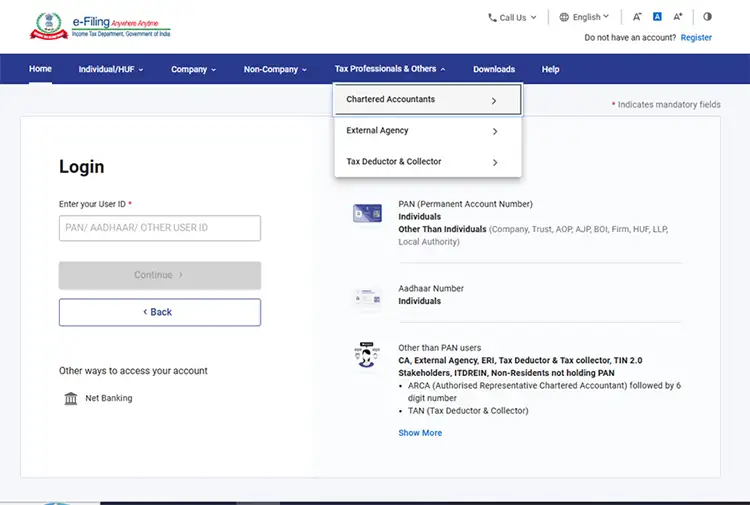
Step 1: Log in to the e-filing portal using your user ID and password.
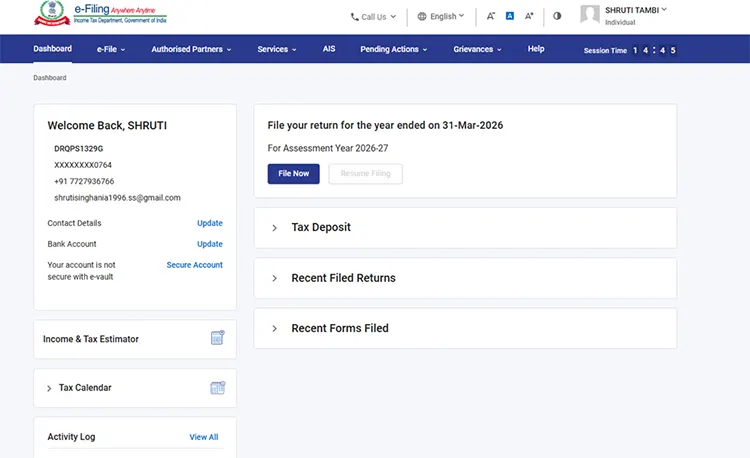
Step 2: On your Dashboard, click on “File Now”.
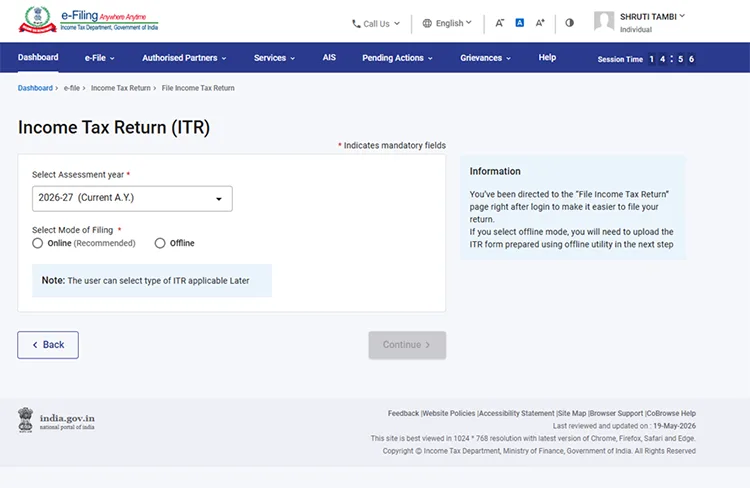
Step 3: Select Assessment Year as 2026-27 and Mode of filling as online, then click continue.
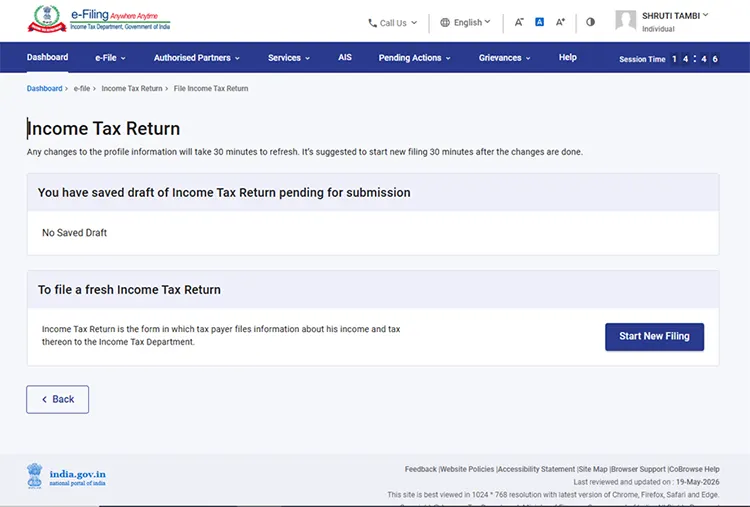
Step 4: In case you have already filled the Income Tax Return and it is pending for submission, click Resume Filing. In case you wish to discard the saved return and start preparing the return afresh, click Start New Filing.
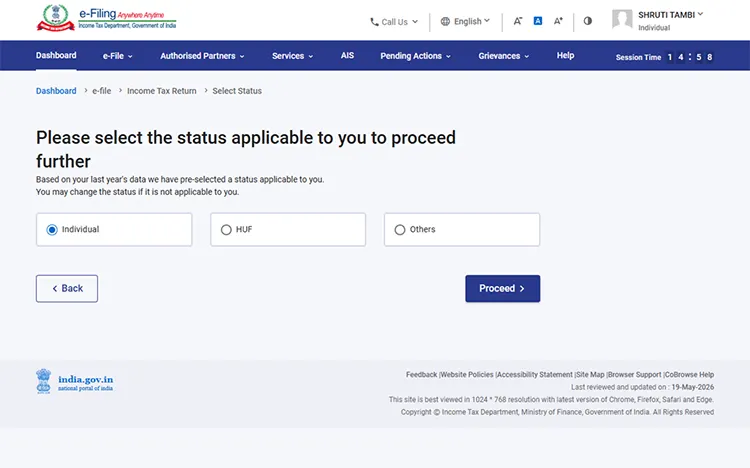
Step 5: Select Status as applicable to you (individual, HUF or others) and click Continue to proceed further.
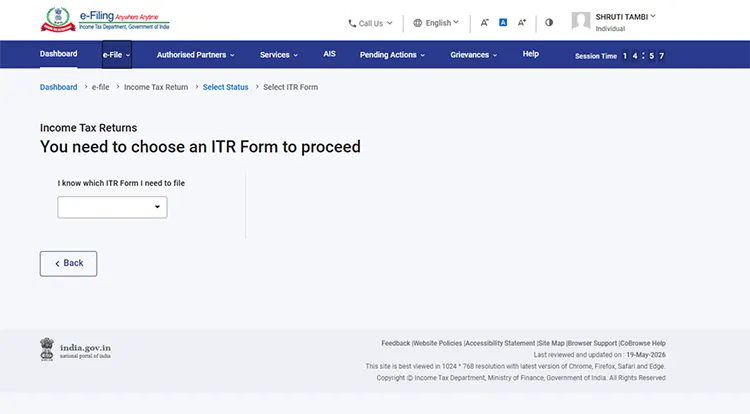
Step 6: Select the ITR Form that you want to file from the dropdown.
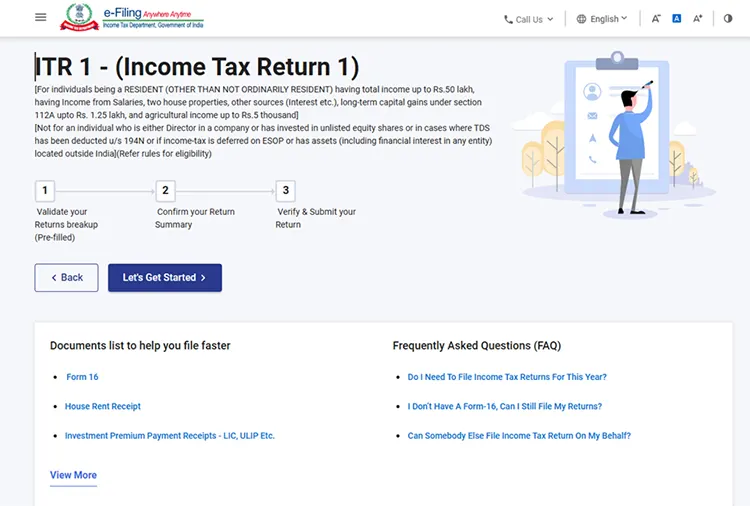
Step 7: Once you have selected the ITR applicable to you, note the list of documents needed and click Let’s Get Started.
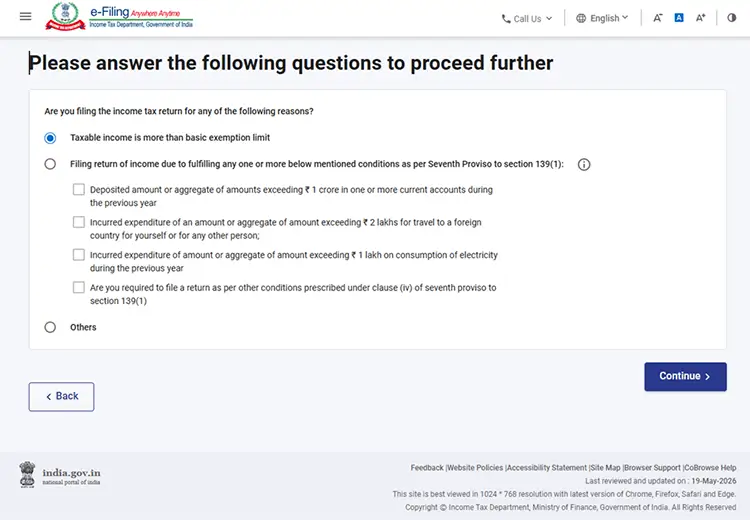
Step 8: Select the checkbox applicable to you regarding the reason for filing ITR and click Continue.
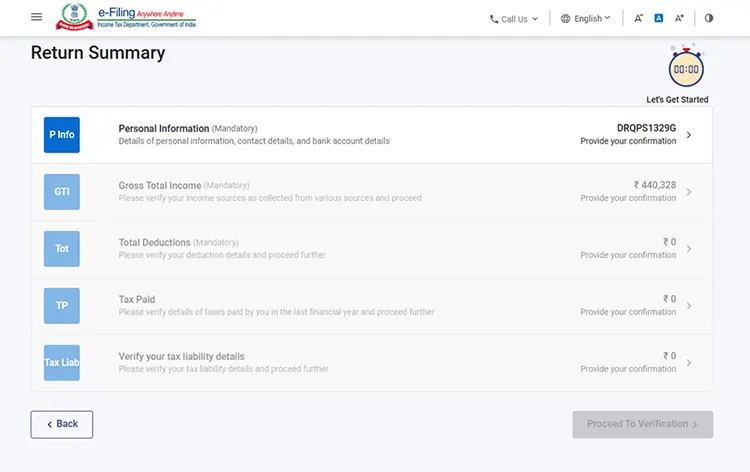
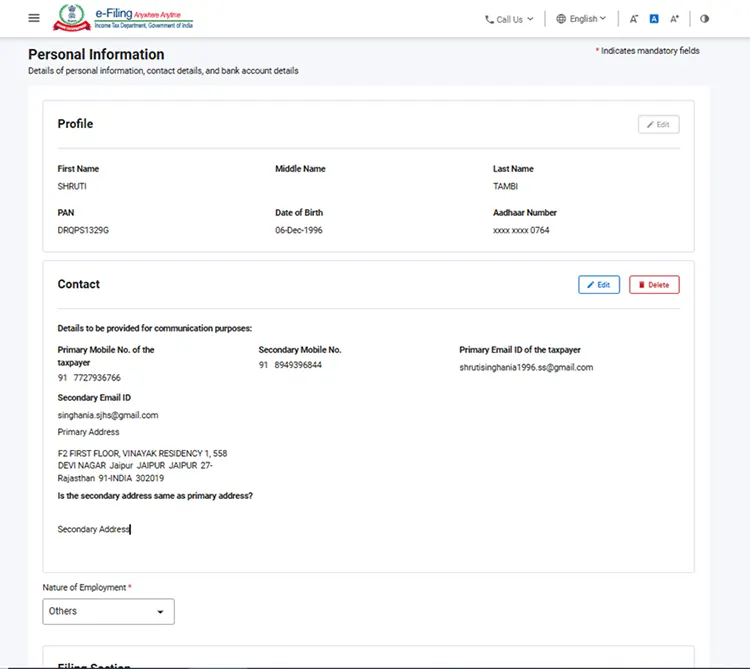
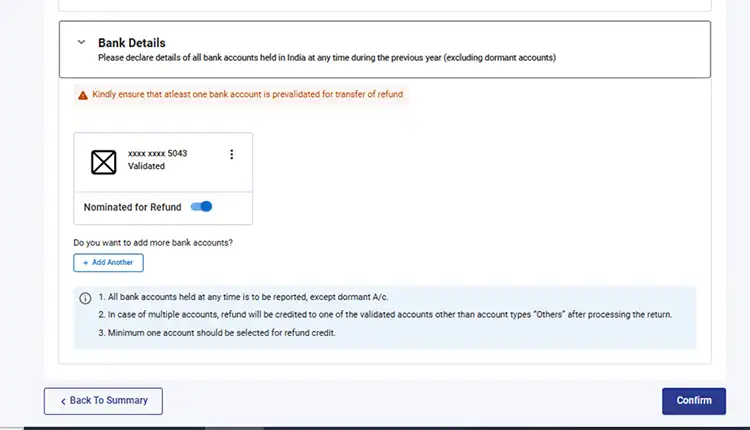
Step 9: Click on the Personal Information tab and verify your personal details, contact details and bank account details.
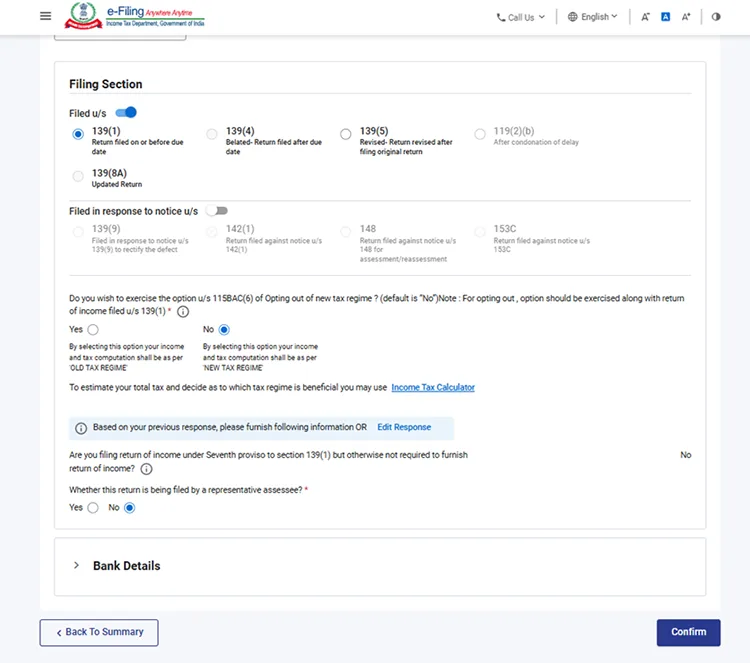
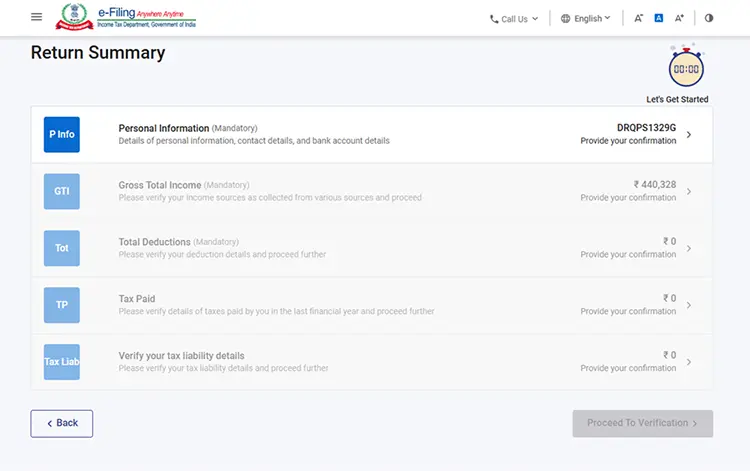
Step 10: The section is divided into three sub parts, personal information, filing section and bank details. Review the pre-filled details in each section and edit the information wherever necessary. Here you can select the type of return you are filing and also switch from old to new and vice versa (if eligible). Once done, click on confirm. You will be redirected to the return summary page.
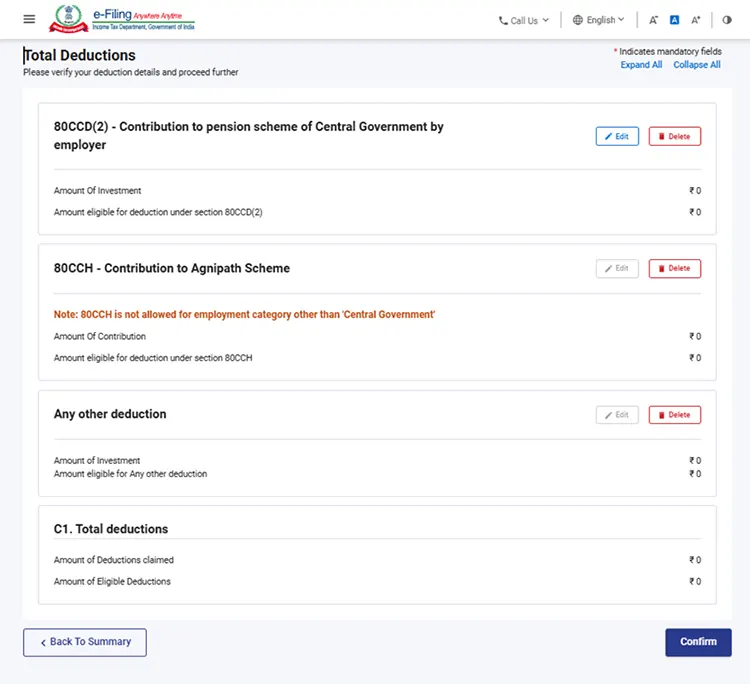
Step 11: After confirming the above details, click on the total deductions tab. This shows the details of all the deductions available. If you have any deductions that you want to claim, you can review and edit your deduction details and click on confirm. Once confirmed, you will be redirected to the return summary page.
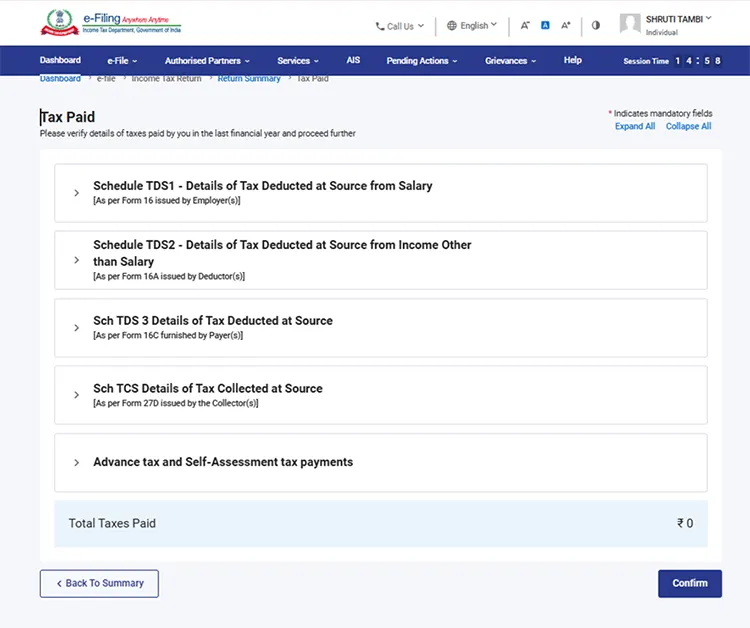
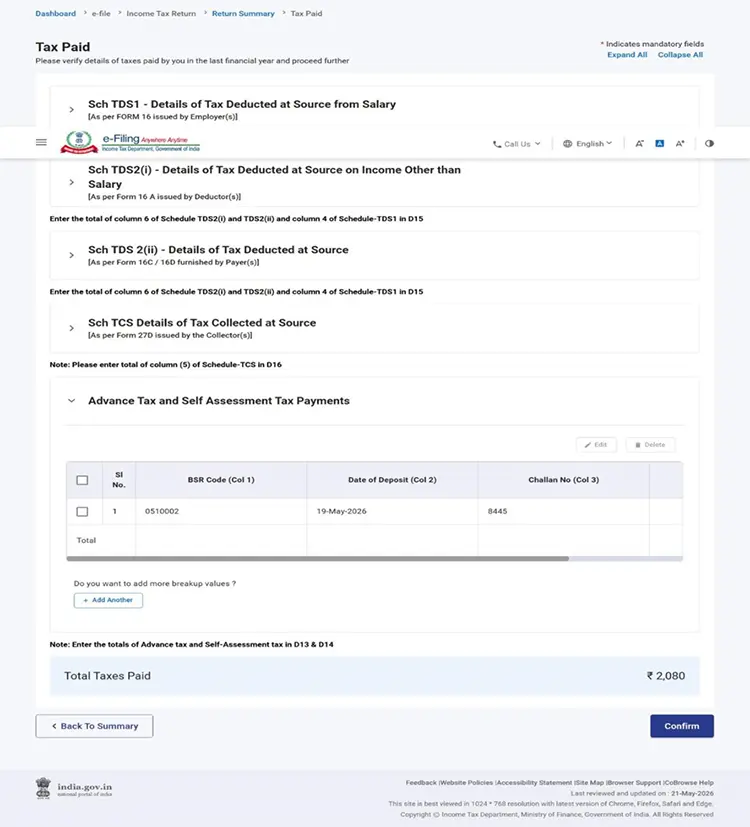
Step 12: Now, click on the tax paid tab. Review the details of taxes already paid, like self-assessment tax, TDS deducted, advance tax etc. Edit the details if necessary and click on confirm.
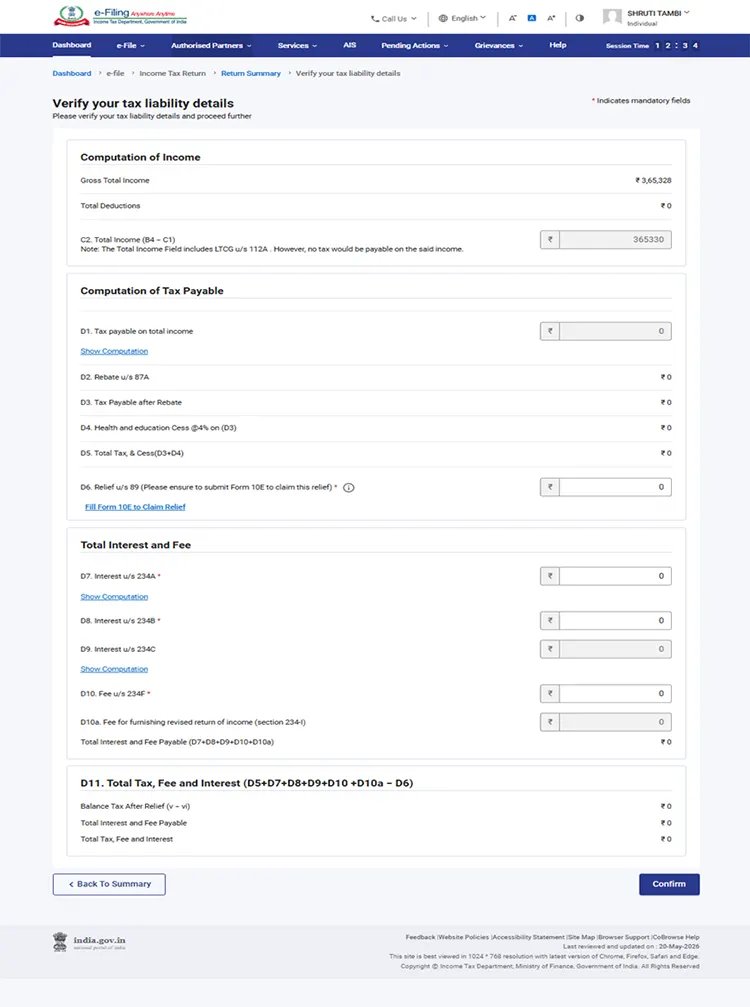
Step 13: After confirming the details, you will be redirected to the return summary page. Now click on the tab ‘Verify your tax liability details’. Here you can see your tax computation, total interest and fee, total tax payable or refund due (if any). You can also add relief u/s 89A (if applicable). Once done, click on confirm.
Step 14: After confirming all the details, click on Proceed to verification. Now, you will be shown a summary of your tax return.
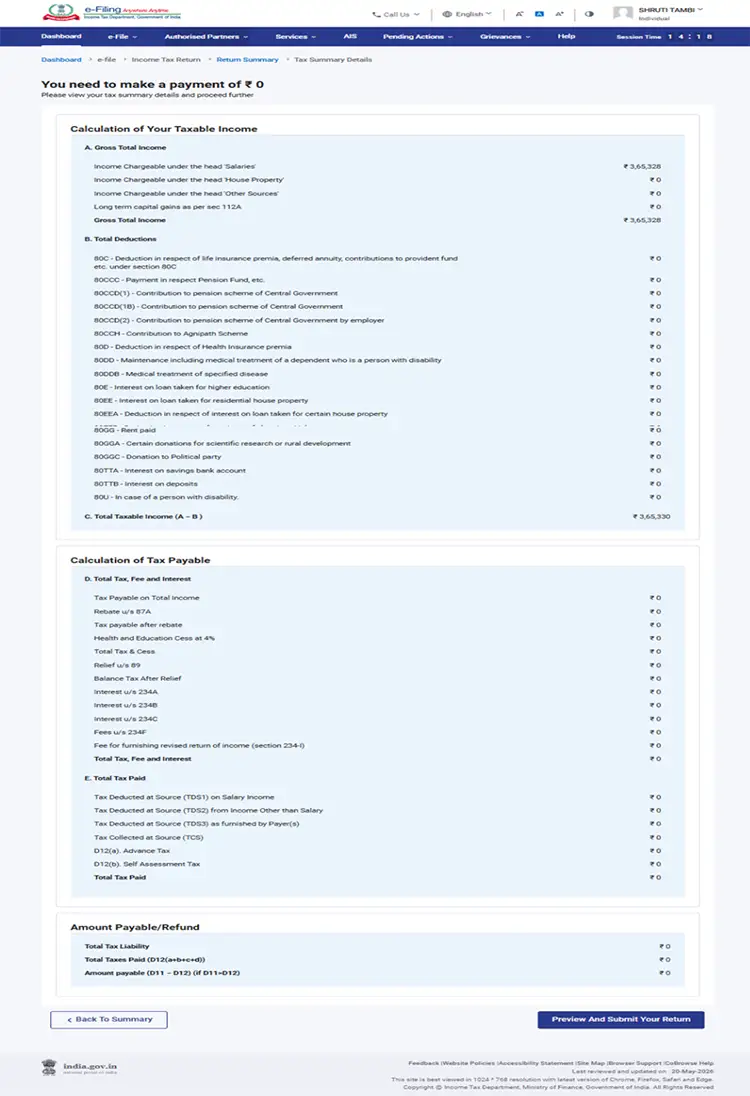
If there is no tax liability
- In case there is no tax liability (No Demand / No Refund) or if you are eligible for a Refund
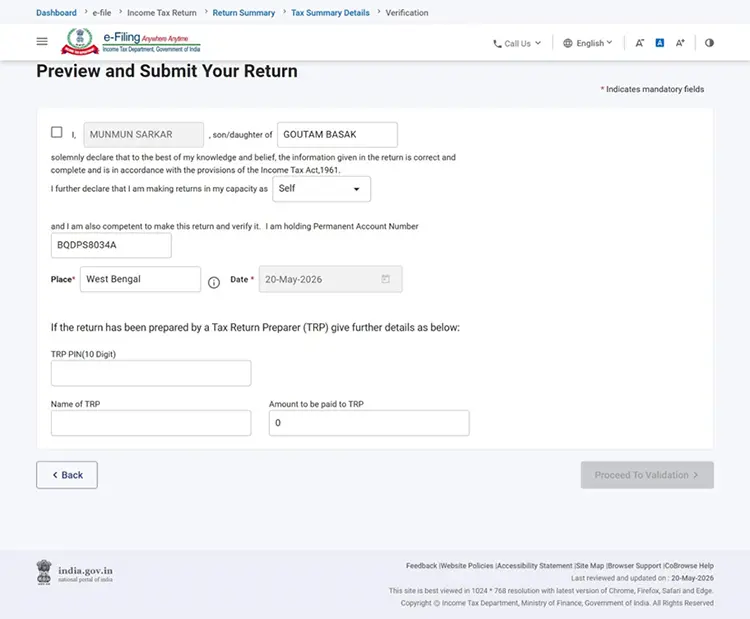
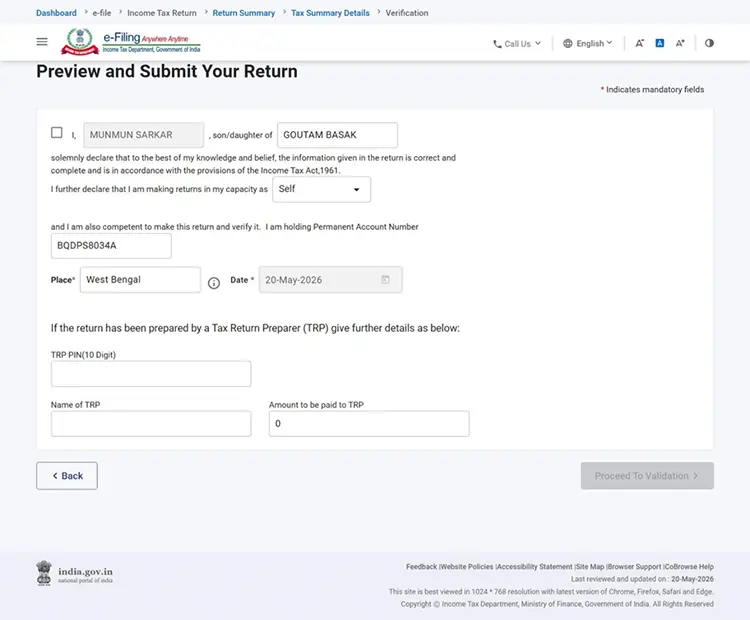
- Click Preview Return. If there is no tax liability payable, or if there is a refund based on tax computation, you will be taken to the Preview and Submit Your Return page.
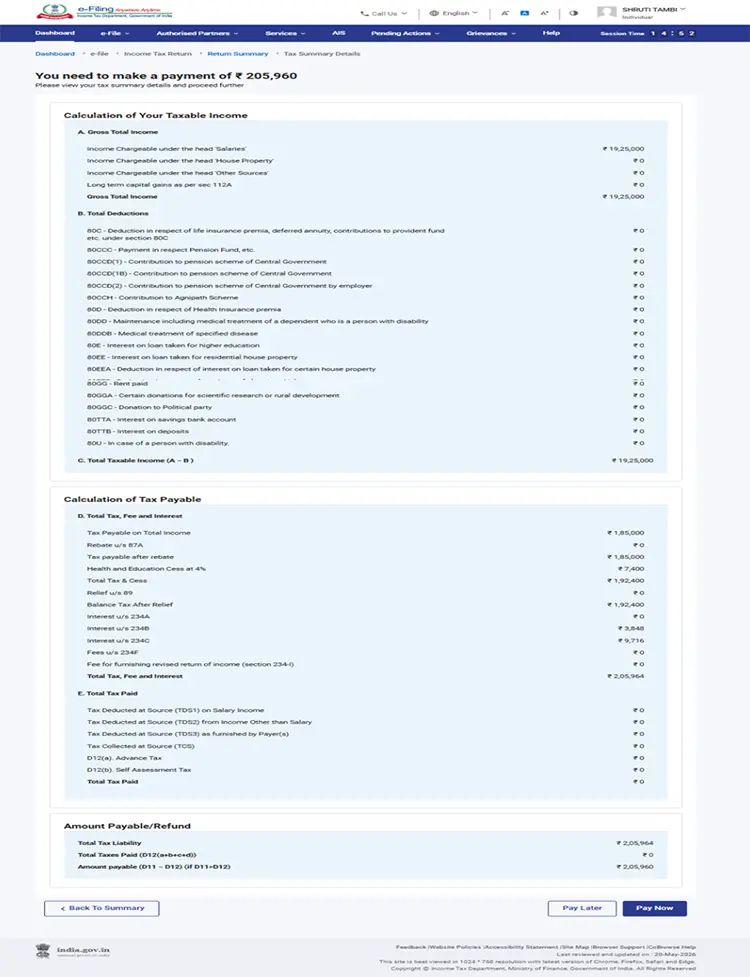
In case there is a tax liability
After clicking on total tax liability, you will be shown a summary of your tax computation based on the details provided by you. If there is tax liability payable based on the computation, you will get the Pay Now and Pay Later options at the bottom of the page.
It is recommended to use the Pay Now option.
If you opt to Pay Later, you can make the payment after filing your Income Tax Return, but there is a risk of being considered as a taxpayer in default, and liability to pay interest on tax payable may arise.
Step 15: If you don’t have any tax liability
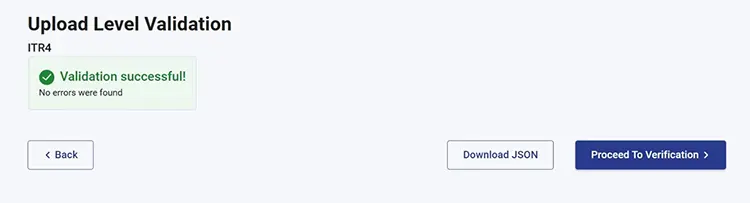
Simply click on Preview and Submit your return. You will be shown a preview of your return. Check all the details, and if everything is correct, click on Proceed to Validation. If you need to correct anything, you can click on back and go to the previous pages to make changes.
If you have Tax Due
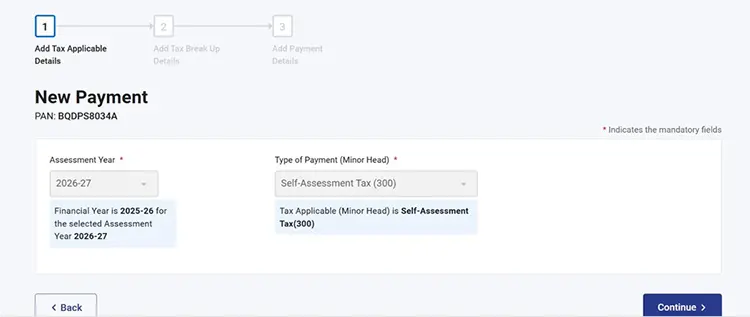
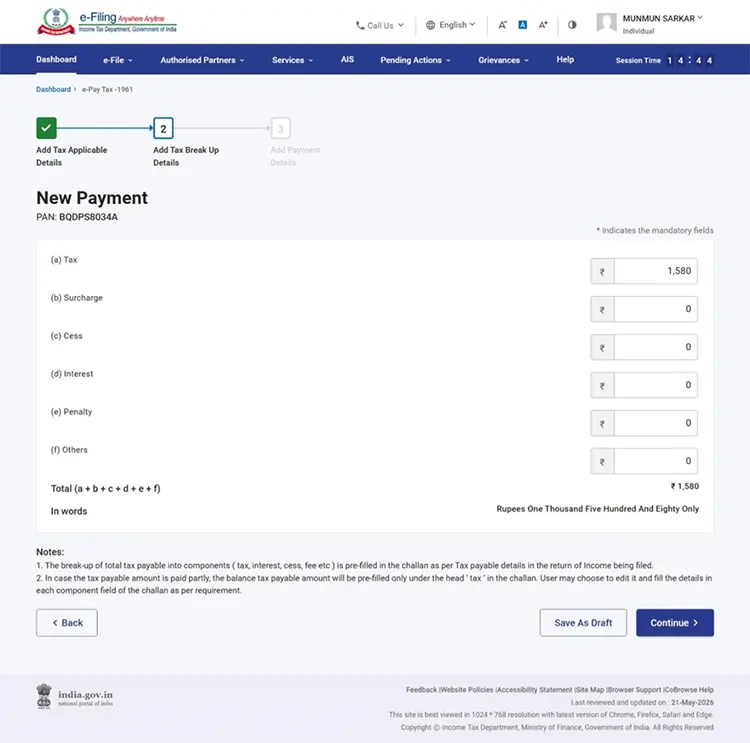
If you click on “Pay Now,” you will be redirected to the e-pay Tax page. Click Continue
On the next page, you will see the tax breakup details such as tax due, surcharge, cess, interest, etc.
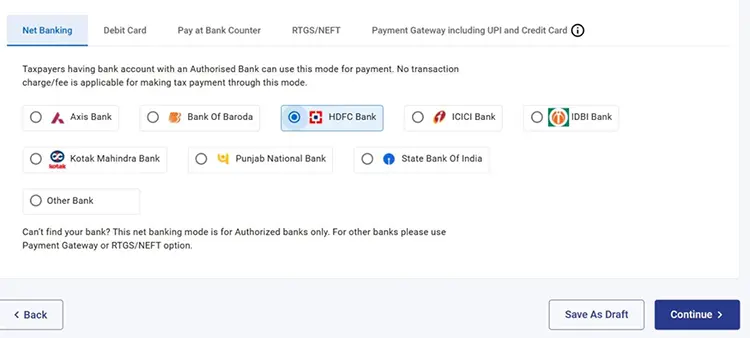
After clicking on continue, you will be redirected to the payment details page, where you can select the mode of payment and complete your tax payment successfully.
Next, you will be redirected to the return summary page. Here, click on Tax paid.
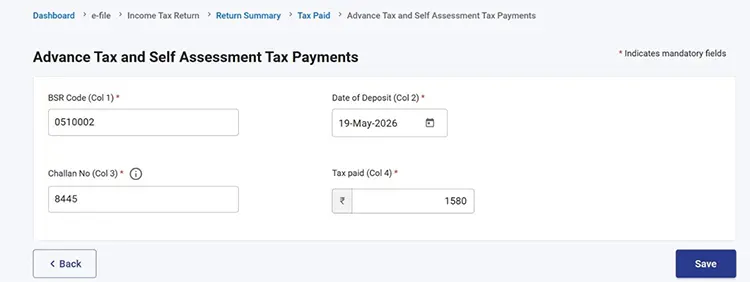
On the next page, enter the challan number and BSR code and click on save.
Review the details and click on confirm.
After clicking on confirm, you will be redirected to the computation page. Verify all the details and click on ‘preview and submit the return’.
Step 16. Now, click on Proceed to verification.
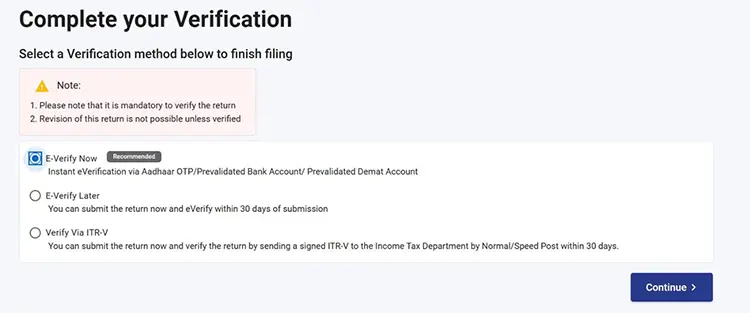
Step 17. On the next step, select whether you want to e-verify now ot later and click on continue.
Note: It is recommended to e-verify immediately, as you must e-verify your ITR within 30 days of filing for it to be valid.
Step 18. You will receive an OTP on your registered mobile number. Upon entering the OTP, your ITR will be filed successfully.
How to File ITR with Tax2Win?
Tax2win offers two types of ITR filings:-
DIY (Self-filing)
DIY (Self-filing)- If you have a little bit of knowledge about taxes, entering some basic details will let you file the ITR within 4 minutes. Tax2win DIY platform is AI-integrated, hence it will auto-select the right ITR form for you itself and thus makes filing super-easy for you. The user interface is friendly and easy. Hands-on today to file ITR for FY 2024-25 and e-verify on time.
If you are wondering how to file an ITR with Tax2win, here are some simple steps you need to follow -
Step 1: Either sign in to the tax2win website using your existing credentials or sign up to the portal and create an account. You can do self-filing only in the case of income from salary, business, and capital gains. Click on “File ITR Now”.
Step 2: After logging in, a table consisting of all the possible sources of income opens. You need to select the income sources that you have. Based on your sources of income, Tax2win’s DIY ITR filing system selects the applicable ITR form automatically.
Step 3. You need to upload Form 16. In case you don’t have Form 16, you can simply skip the option and proceed further.
Step 4. Select the F.Y. and enter the PAN Details and DOB. (If you don’t have a registered account with the Income Tax Department, you will receive an OTP and a new account will be created.). You can also choose if you want our DIY software to fetch your personal details and get data pre-filled.
Step 5: Enter a few basic details in the next step. Some of it is pre-filled from the Income Tax Department’s database. Remember to cross-check the information available. As shown in the image given below, you have to enter your personal details like name, email ID, date of birth, father’s name, gender, etc.
Step 6: In the next step, you have to provide your address details and employer category. You can refer to the image below to understand this better.
Step 7: In the next step, you have to fill in your employment details. The standard deduction is applied automatically in the case of salaried employees. As shown in the image below, you have to enter your gross salary/CTC, exempted allowances like HRA, LTA, gratuity, net salary, and standard deduction and professional tax under section 16. Note that if you have uploaded Form 16, your employment data will be pre-filled in the ITR Form. All you have to do is verify the information and proceed to file ITR.
Step 8: If you have capital gains income, you need to select ‘Income from capital gains (shares, Mutual Funds, Property, etc) while selecting the source of income. Navigate to the ‘Capital Gain Income’ tab from the top of the page and upload the P&L statement.
Here’s an example of how to upload the Groww P&L statement -
-
Click on ‘Groww.’
-
From the pop-up window, click on browse files and upload the P&L statement.
Note: If your brokerage or fund house is not supported, you can upload your details using the Tax2win Template.
Here’s how to download the Tax2win template -
-
Click on the Tax2win Template.
- Click the 'Download Tax2win Template' button in the first step to download the template.
-
Fill in your capital gain investment details as instructed in the template. Then, upload the completed template by clicking the 'Browse Files' button. Tax2win will read your transactions and calculate your capital gains details within minutes.
Step 9: Enter the details of the investment made during the year to calculate the applicable deductions. You have to enter details of investments in PPF, LIC, PF, housing loan, FDR, NSC, tuition fees, premiums paid to the annuity, and other 80C deductions. Also, you can claim deductions like 80D, 80CCD (1B), 80G, etc.
Step 10: In this step, you are required to enter your bank details. Enter your IFSC code, name of the bank, account number, and Aadhaar details. As per government law, it is mandatory to show all the bank details. You can select one account as the primary account. Remember, you will get a tax refund in your primary bank account.
Step 11: In this step, you have to upload Form 26AS, and your TDS details will be auto-populated. If you don’t have Form 26AS, you can skip it and fill in the details manually before filing your ITR. If you have paid the tax, select yes on Advance Tax and self-assessment tax paid, enter the challan details, and click on Continue.
Step 12: Select the return filing type. If it is your first time filing ITR for the relevant assessment year, then select original return and click on continue.
Step 13: Based on the information given by you in the previous sections, the software automatically computes your tax liability using both the old and the new regime. You can compare both regimes and select the one that is more beneficial for you.
Step 14: You can use any of the methods mentioned above to e-verify your ITR. If you have already e-verified your ITR, click on Already e-verified.
Step 15: A code will be sent to the mobile number linked to your Aadhaar. Enter the EVC and verify your return. You also have the option to change the e-verification method here.
Step 16: Once you enter the EVC, your ITR will be e-verified successfully.
File ITR Now
The second way through which you can file ITR on Tax2win is:-
Expert-Assisted ITR Filing
Step 1. Click on Book eCA Now.
Step 2. Either sign in to Tax2win or register yourself on Tax2win by creating an account.
Step 3. Choose from where your income is and click on next.
Step 4. Select how many employers you have and click on next.
Step 5. Select if you have business or professional income and click on next.
Step 6. Select if you own a house or not and click on next.
Step 7. Select if you have any income from capital gain or not and click on next.
Step 8. Tax2win’s AI-integrated software automatically suggests the most suitable plan based on your needs. You can pay the fees and connect with an eCA to get a smooth ITR filing experience. If you have any other queries, you can also get in touch with our customer support executive at the number given on the website.
Book Your eCA Now
Click here to learn more about ITR filing with Tax2win.
What Will be the Next Steps After e-filing of Income Tax Returns?
Once you are done with the e-filing of your income tax return, you must:-
- Check your inbox for the email id as provided in your income tax return form, You will receive an intimation for the successful filing of your Income Tax Return, along with ITR-V (Acknowledgement) attached with eMail.
- Cross-check all figures thoroughly in your filled ITR form or ITR-V for any error, mistake, etc.
- Verify the Income-tax return by sending a physical copy to CPC Bangalore or you can e-Verify online. Once the return has been successfully Verified, the return filing procedure ends here. And now your job is done.
- In case you have a refund in your tax return, you shall receive the same in your bank account within the next few days. It is better to keep tracking your income tax refund status so that you do not miss out on any important updates from the department. You can check the refund status here.
Note:- Verification of an ITR is an important step without which your return filing process is not completed. If you fail to verify your ITR within the time limit (30 days), it shall be considered “Invalidate,” i.e., null and void. It means that no Income Tax Return has been filed at all.
File your Income Tax Return with absolute ease with us in just 3 steps:
- Upload Form 16: Visit our e-filing portal, select your sources of income & upload Form 16.
- Review: Our advanced software automatically picks up the required information & fills in your details by itself. Simply review the information.
- File ITR: As soon as you give your confirmation, our system files your income tax return online.
You can learn more about Form 16 here.
What will happen when I have taxable income but do not File my Income Tax Return?
Having taxable income and not filing an income tax return can put you in trouble with the Income Tax Authorities. Be prepared to welcome notices from the Income Tax Department along with fines and penalties. The consequences of non-filing of return are:
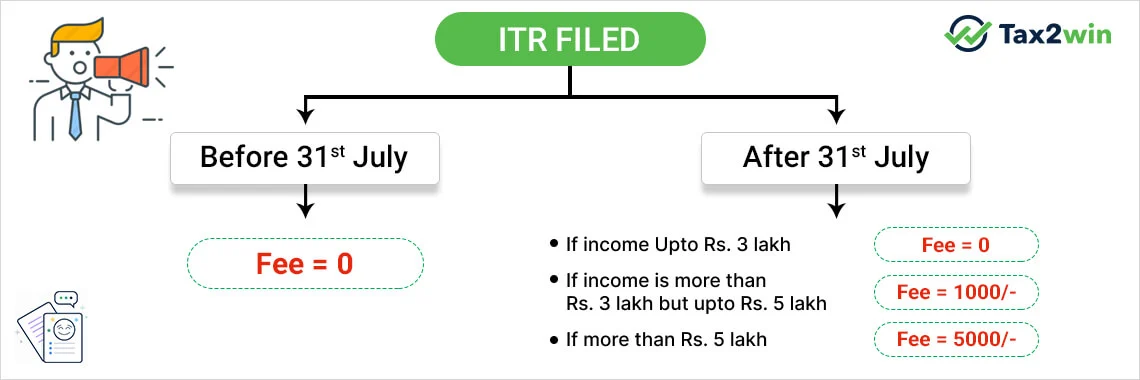
- Late filing Fee u/s 234F shall be levied if the return is not filed on or before the due date. The quantum of fees shall vary according to the amount of your income and return filing date. The maximum fee levied is Rs. 5000/-.
-
Notice u/s 142(1), which requires you to file your return if you have not filed it before the due date. if you fail to comply with this notice, then it may result in
(a) Best Judgment Assessment u/s 144 and/or
(b) Penalty of Rs. 10,000 u/s 271(1)(b) and/or
(c) Imprisonment with or without fine u/s 276D.
- Notice u/s 148 for furnishing return within the period as mentioned in the notice itself.
-
As per Section 270A, if income is under-reported due to
- Wrong disclosure/misreporting then the penalty shall be leviable @200% of tax payable on such income and
- In any other case, the penalty shall be 50% of the tax payable on such income
- A penalty of a minimum of 100% to a maximum of 300% of the amount of tax for concealment of income u/s 271(1)(c).
- Interest u/s 234A keeps on mounting at the rate of 1% per month/ part of the month till the time you file your return. Also, you'd be required to pay interest u/s 234B and 234C, both at the rate of 1% per month/ part of the month if you've not complied with the advance tax provisions at the time of late filing of return.
- If you have losses (Business, Capital loss) that you want to be carried forward, you can not carry forward your loss if you do not file an Income Tax Return or file after the due date.
Now that you know how to file an ITR online you must also be aware that there are various methods to save tax while filing an ITR. But, making the most of these deductions and exemptions requires proper planning. Therefore, it is recommended to take help from tax experts who can help you save your hard earned money.