Income Tax Notices

Income Tax Notice: Meaning, Types, Reasons, PDF Download & How to Respond

Income Tax Notices are written communications sent to individuals by the Income Tax Department to inform them that their return has been filed and has been picked for scrutiny. There can be various reasons for receiving an income tax notice. After receiving the notice, taxpayers must act on it and resolve it within the given timeline.

  • 5500+ Notices Resolved5500+ Notices Resolved
  • Trusted by 1 Million+Trusted by 1 Million+
  • Secure & SafeSecure & Safe

Got Income Tax Notice?

Updated on: 05 Jan, 2026 02:15 PM

Types of Income Tax Notices

The income tax department sends different types of ITR notices to taxpayers depending on the cause of the notice. These notices are as follows –

Notice under Section 142(1)

Income Tax Notice Section 142(1)

A ITR notice is served by the assessing officer u/s 142 1 in two cases. Firstly, if the officer requires additional information and documents pertaining to your income tax returns...

Read more
Notice sent under Section 139(9)

Notice sent under Section 139(9)

If the AO believes that a defective income tax return is filed, he will serve you an income tax defective return notice under section 139(9). The error can be missing information, selection of the wrong ITR form...

Read more
Notice under Section 148

Notice under Section 148

This ITR notice is sent in cases where the assessing officer(AO) has a reason to believe that a taxpayer has filed his ITR on a lower income or not filed when the law mandated him...

Read more
Notice sent under Section 156

Notice sent under Section 156

If there is any type of demand like penalty, fine, tax or any other amount which the taxpayer is supposed to pay to the income tax department, a income tax notice under Section 156 would be issued...

Read more
Intimation under Section 143(1)

Intimation under Section 143(1)

After you file and verify your ITR, they are processed online by the tax department. Intimation u/s 143(1) is computer generated initial assessment which is sent to all the taxpayers u/s 143(1)...

Read more
Notice under Section 143(2) for scrutiny assessment u/s 143(3)

Notice under Section 143(2) for scrutiny assessment u/s 143(3)

A notice u/s 143(2) is sent to the taxpayer if the Tax Department chooses to scrutinize the ITR of the taxpayer. The assessing officer sends this notice within 6 months from the end of the financial year...

Read more
Notice under section 131

Notice under section 131

If the assessing officer believes that the tax payer is concealing his income or a part thereof, he can serve a notice under this section...

Read more
Notice under section 245

Notice under section 245

This notice u/s 245 of the Income Tax Act is served by the assessing officer(AO) if it is believed that you have not paid taxes in the previous FY...

Read more

Didn’t show your crypto earnings in ITR? CBDT’s tracking it—update your return before a notice lands. Update your Tax return with Experts

Income Tax Notice: Reasons for Receiving

The most common causes for which you might receive an income tax notice include the following –

  • ITR Mismatch
  • Mismatch in the amount of TDS reported.
  • An error in your income tax return.
  • Lack of submission of all the documents.
  • Non-filing or delayed income tax return filing.
  • When you invest in the name of your spouse and do not mention the same in your income tax returns
  • If high-value transactions have been done during the financial year and have not been properly reported in the ITR.
  • Inaccurate Information on Assets or Income
  • If the assessing officer does random scrutiny of your income tax return.
  • When long-term capital gains earned from equity investments are not reported correctly.
  • If the taxpayer does not disclose any income or there is a discrepancy in the disclosed income.
  • If a wrong income tax return form is used for filing the income tax return.
  • If your refunds can be set off against the previous year's tax liability.
  • If you have evaded tax in previous financial years.
  • If the Self-assessment tax still needs to be paid.
  • If you have claimed fake deductions, you might receive a notice under section 143(2).

Here are the common mistakes that might lead to incom e tax notices.

What to do after receiving an income tax notice?

When you receive an ITR notice under any of the aforementioned sections, the following steps should be taken –

  • Read the notice thoroughly to find out why it has been sent
  • Check the basic details on the notice to ensure that the notice is meant for you. The notice should contain your correct name, PAN number, address, etc., to authenticate that it is sent to you. Also, check the assessment year mentioned in the ITR notice.
  • Find out the discrepancy in your income tax return that caused a notice to be served, if any.
  • Respond to the ITR notice within the stipulated time period to avoid penalties and prosecutions.
  • Ensure that your response is backed by adequate information.
  • Also, make sure to check the notice that you have received is reflected in your income tax account online. Take expert help

Legal Consequences of Ignoring an Income Tax Notice

Ignoring a tax notice can lead to penalties, fines, and further legal action by the tax authorities. Your return may be treated as invalid, and therefore, consequences such as penalty, interest, non-carry forward of losses, loss of specific exemptions may occur, as the case may be, in accordance with the Income Tax Act. It may also result in additional tax liabilities and damage to your financial reputation.

Income Tax Notice Sample Format

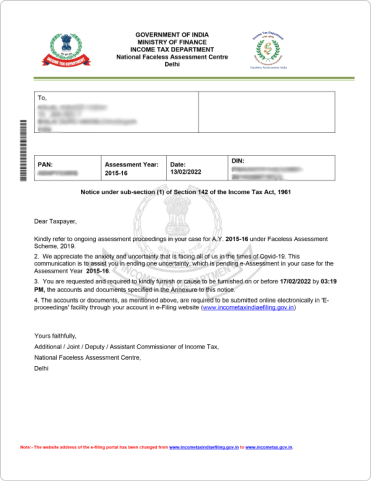
Section 142 (1)

Section 142 (1)

Return not filed within the due date of assessment period
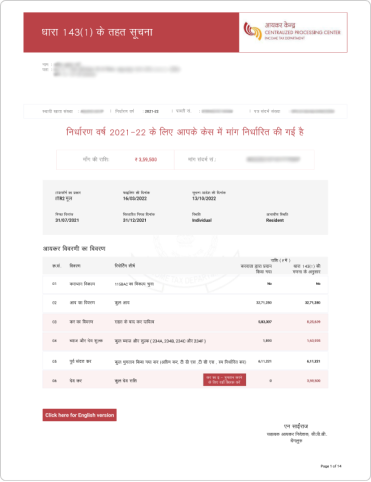
Section 143 (1)

Section 143 (1)

Return processed successfully. Error in the amount of deduction, loss claimed, etc.
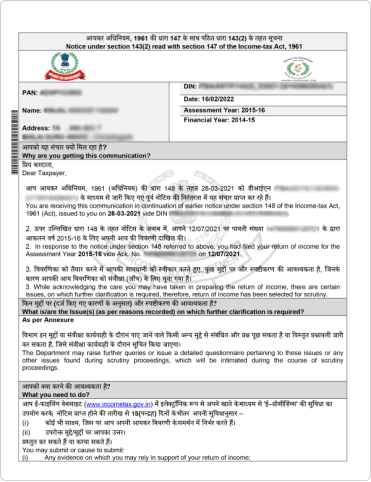
Section 143 (2)

Section 143 (2)

Notice to reconfirm that the tax return filed is accurate, and deduction has not been claimed in excess
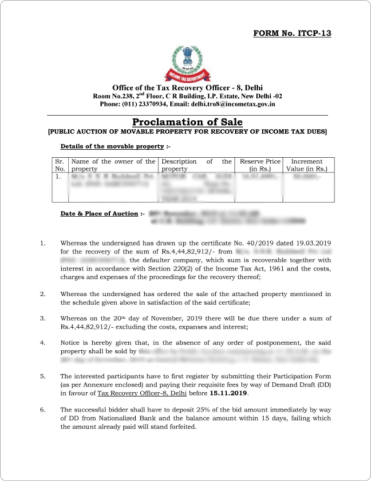
Section 143 (3)

Section 143 (3)

Detailed assessment notice to ensure all claims, deductions, etc., are filled correctly without any errors.
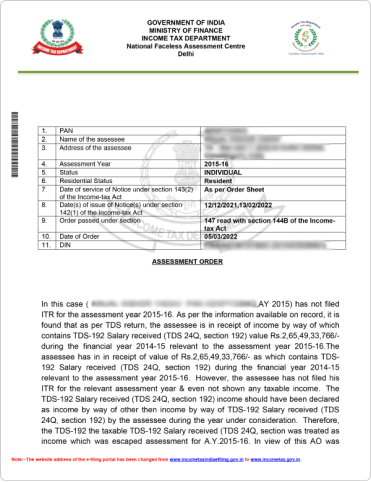
Section 147

Section 147

A notice sent if the assessing officer feels that any income has not been assessed
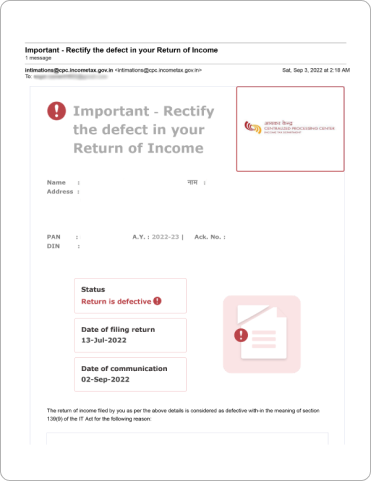
Section 139 (9)

Section 139 (9)

In case of inaccuracy in returns such as missing information, incorrect filling of return, etc.

Essential Documents to Respond to an Income Tax Notice

The type of documents required for replying to an income tax notice depends on the type of notice received. Here are some basic documents that are common to every notice -

  • The Income Tax Notice copy.
  • Proof of Income source such as (Part B ) of Form 16, Salary receipts, etc.
  • TDS certificates, Form 16 (Part A), an indemnity bond, and a letter requesting rectification.
  • Investment Proof if they are applicable.

How to Check and Authenticate Notice Issued by ITD?

Before responding to a tax notice received, it is important to authenticate it. Here are the steps to authenticate income tax notice online on the income tax portal -

  • Step 1. Visit the income tax portal and click on “Authenticate notice/order issued by ITD” under the section “Quick Links.”
    income tax portal
  • Step 2. You can authenticate your income tax notice using

    PAN, assessment year, document type, mobile number, and issue date.

    • Fill in all the details like PAN, assessment year, document type, etc.
    • After filling in the details, enter the OTP received on your registered mobile number.
    • After OTP validation, you can see the date of the issue of the notice along with the DIN of the notice issued. If no notice has been issued, a message will be displayed saying, “No record found for the given criteria.”

    Authenticate using DIN and mobile number.

    • Enter your mobile number and DIN number.
    Authenticate using DIN and mobile number
  • Step 3. To authenticate using your PAN, document type, assessment year, issue date, and mobile number, select the appropriate option and enter all the required details.
    authenticate using your PAN
  • Step 4. After entering all the details, you will receive an OTP. Enter the OTP you received. Once validated, the DIN of the notice and the date of issue will be displayed.
    Enter the OTP

    If the notice is not issued by the ITD, a message saying "No record found for the given criteria" will be displayed.
    No record found for the given criteria
  • Step 5. Another option is to authenticate using your DIN and mobile number.
    Another option is to authenticate
  • Step 6: Enter DIN and mobile number and continue. You will receive an OTP. Validate using OTP.
    If the notice/order is issued by the income tax authority, it will display a success message, as shown below.
    Enter DIN and mobile number and continue

Time Limit for Issuing Income Tax Notice

Up to 4 Years from the End of the Relevant Assessment Year (AY)
Only an officer of the rank of Assistant Commissioner or above can issue a notice under Section 148. The Assessing Officer must record the reasons and act on the direction of the Joint Commissioner before issuing such a notice.
Example: For AY 2017-18, a notice under Section 148 can be issued up to 31st March 2022.
(Assumed timeline based on provisions before the Finance Act, 2021)

How to Download Income Tax Notice PDF from e-Filing (step-by-step)

You can download your income tax notice directly from the official e-Filing portal. Follow these simple steps:

Step 1: Log in to the e-Filing portal

  • Visit incometax.gov.in
  • Log in using your PAN, password, and OTP.

Step 2: Go to the e-Proceedings / Notices section

After login, go to Pending Actions or e-Proceedings on the dashboard. (In some cases, you may find the notice under “View Notices” or “e-Proceedings” from the menu.)

Step 3: Select the relevant notice

  • You will see a list of notices issued to you.
  • Click on the Section 156 demand notice or the relevant notice you want to download.

Step 4: Download the notice PDF

  • Click on View or Download PDF.
  • Save the notice on your device for future reference.

Step 5: Check the details

  • Verify the DIN, assessment year, amount demanded, and due date mentioned in the notice.
  • Make sure the notice matches what is shown in your e-Filing account.

Where to find your income tax notice online

You can find all income tax notices in your account on the official e-Filing portal. Here’s where to check:

  • Log in to incometax.gov.in using your PAN.
  • Go to Pending Actions on the dashboard to view active notices.
  • You can also click on e-Proceedings or View Notices from the menu.
  • Select the relevant notice to view or download the PDF.

Always check the notice inside your e-Filing account, even if you receive an email or SMS alert.

Beyond 4 Years but up to 6 Years from the End of the Relevant AY
Only the Chief Commissioner or Commissioner can issue a notice under Section 148, and only if they are satisfied that income exceeding ₹1,00,000 has escaped assessment.
Example: For AY 2017-18, a notice can be issued until 31st March 2024.
(Assumed timeline based on provisions before the Finance Act, 2021)

Beyond 6 Years but up to 16 Years from the End of the Relevant AY
The department can issue a notice under Section 148 if the escaped income relates to an asset (including financial interest in any entity) located outside India and is chargeable to tax in India.
Example: For AY 2017-18, a notice can be issued up to 31st March 2034.
(Assumed timeline based on provisions before the Finance Act, 2021)

How Can Tax2win Help You Respond to an Income Tax Notice?

Salaried employees are now receiving income tax notices for claiming fake deductions and exemptions, misreporting income, etc. With stricter rules and increased reporting requirements, taxpayers are now receiving notices even for small errors. However, if you are vigilant and respond to the notice accurately and within the stipulated time frame, it can be resolved easily.

Received a tax notice from the Income Tax Department? Don’t worry—Tax2win’s got your back! Here's how we make it stress-free:

  • Expert Guidance: Get personalised assistance from our team of experienced CAs and tax professionals.
  • Detailed Notice Analysis: We decode the notice to help you understand exactly what the IT Department wants.
  • Right Documentation: We help identify and compile all necessary documents needed for your reply.
  • Drafting Accurate Responses: Our experts prepare clear, compliant, and timely replies to avoid penalties.
  • Complete Compliance: We ensure your response aligns with tax laws to reduce the chances of further queries.

Don’t ignore that notice—get it resolved with ease! Connect Today

Got Income Tax Notice? Don't Panic
Let tax experts help you with Responding and Resolving the notices

  • 1,00,00+ Notices Resolved
  • Handled by the Experts
  • Timely Resolution
Contact Us Now Contact Us Now

FAQs on Income Tax Notice

Income Tax Department sends notices to taxpayers for reasons such as non-filing of returns, filing defects, or requests for additional information. These notices, known as income tax issue letters, facilitate compliance with tax laws and address discrepancies, ensuring fairness in the tax system.
EXC -001 means that you have done a transaction that is beyond the permission of the Income Tax Act. It is for cash transactions exceeding INR 10 lakh in a month
Yes, a salaried person can also get an income tax notice. The notice u/s 143(1) is an intimation that ITD sends to every taxpayer. However, you can receive other income tax notices if ITD has reasons to believe that income has been concealed by you or on any other grounds.
If ITD has issued any notice, it will be delivered to your registered email. You can check notices received by you through the income tax notification portal but remember, only some of the notices can be checked through the portal; for all notices inquiries, you can visit ITD and ask your query there. You can also check the authenticity of the notices issued by using “Authenticate notice/order issued by ITD” under quick links on the Income Tax website.
Yes, the income tax notification department can issue ITR notices for current account transactions as well if it has a reason to do so. For example, any transaction exceeding Rs 50 lakhs in a current bank account in a financial year should be disclosed to ITD; otherwise, they may issue notice for the same.
The communication of proposed adjustment u/s 143(1)(a) of the Income Tax Act, 1961 refers to any information by the department that they are proposing some adjustment against refund claimed by you in your income tax return, like the incorrect claim in ITR, disallowance of loss claimed in ITR, arithmetical error in ITR, etc. Such adjustment could be regarding any outstanding demand of previous assessment years.
The Income Tax Department issued a discrepancy in notice u/s 143(1), and the discrepancy can be favorable or not. If any demand raised is correct, then pay the same. IT will certainly pay you if any refund is INR 100 or more.
If any mistake is apparent from the record, you can file rectification u/s 154 (1) intimating the correction of mistakes: Click on ‘e-file’ and choose the ‘Rectification’ option from the drop-down list.
A notice u/s 143(2) for scrutiny assessment can only be issued up to a period of six months from the end of the financial year in which you furnished the return.
If you get an income tax notification, you should understand why the notice has been sent. Notices may be sent due to various reasons. For example, Notices may be sent for the details and papers required by the Income Tax Department, and it still needs to be submitted. In such a case, you need to provide the details as required. If there is any error in the ITR, then notices may be sent to rectify the error. In such a case, you should rectify any error in your return and respond to the notice within the time specified by the income tax department to avoid possible penalties.
If you don't respond to the income tax notice, there can be different types of consequences depending upon the type of Notice you have received. Such consequences include fines of up to INR 10,000 and also imprisonment for up to a year.
The income tax department issues an intimation letter/notice under section 143(1) after your return is successfully processed. It has the details of the information you submitted at the time of filing of ITR and a corresponding column showing the details as per information available with the tax department. This intimation has to be sent within one year from the end of the financial year in which the return is being filed.
You can reply to an income tax notice online. You can visit the online website of the income tax department, which is used for the e-filing of returns. Log into your online account, go to the compliance section, and respond to the notice you have received.
You can pay your tax on-demand online. To do so, you can visit the e-filing website of the income tax department and log into your account. You can then check the amount of outstanding tax demand under Response to Outstanding Tax Demand under the pending actions option. Then, under the Pay Now column, choose Click Here. You would be taken to the NSDL website to fill out the online form and pay the tax on demand. Also, you can directly pay tax by clicking the Pay Now option for the respective DRN (Demand Reference Number) on the Response to Outstanding Demand page.
If you don't respond to the notice within 30 days, the income tax department will adjust if there is some outstanding demand without giving any further opportunity to respond.
ITRV (acknowledgment) is received on your registered mail ID soon after you file ITR. Otherwise, it can also be downloaded from your account on income tax India's official website.
To submit your response for outstanding tax demand online
  • Log in to the income tax India efiling website using your PAN and password
  • Go to the pending actions section from the top banner
  • Select Response to Outstanding Tax Demand and proceed.
To submit your response for outstanding tax demand online

You must authenticate the notice/order issued by the income tax authorities to verify that the notice, order, or communication you received from the income tax authority is genuine.

How to Check for an Income Tax Notice Online

  • Visit the official e-filing portal and log in using your PAN, Aadhaar, or User ID.
  • Go to your dashboard.
  • Under 'View Filed Returns', check if any notices are linked to your returns.
  • You can also view notices under the 'Worklist' section.
Kamal Murarka

Kamal Murarka
Director - Tax Research & Operations

Kamal Murarka, a Chartered Accountant, is the Director- Tax Research & Operations at Tax2win. He has been with the company since its inception, contributing his expertise in national and international tax assignments. He is also a recognized speaker on tax-related topics, representing Tax2win at various industry forums. His deep knowledge and strategic insights have been crucial in shaping Tax2win’s approach to tax research, operations, and client solutions, driving the company’s continued success.