What is ITC-02 and Who Should File it?
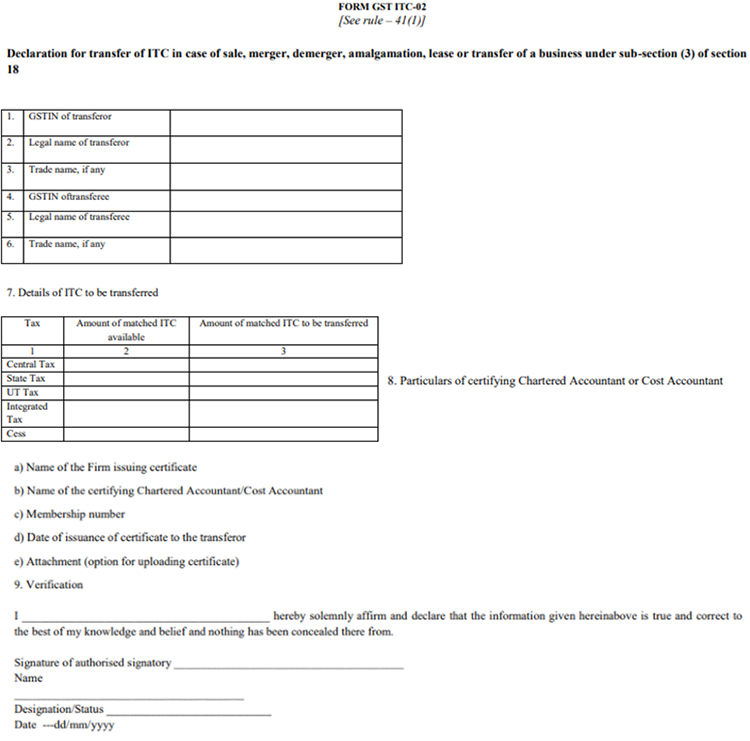
ITC-02 is a declaration filed on the GST portal that allows a registered taxpayer (the transferor) to move unutilised ITC from its electronic credit ledger to another GST registration (the transferee) when the business — or part of it — is transferred by way of sale, merger, demerger, amalgamation, or similar arrangement. The transferor prepares and files ITC-02; the transferee then accepts or rejects the transfer online.
How to File ITC-02 on the GST Portal?
The ITC transfer involves two steps:
- The transferor files Form GST ITC-02 declaring the unutilised ITC to be transferred.
- The transferee accepts or rejects the transfer on the GST portal.
Below are the steps the transferor must follow to file ITC-02:
Step 1: Log In
Log in to the GST Portal using your credentials.
Step 2: Open ITC-02
Go to Services > Returns > ITC Forms and select ITC-02.
Click “Prepare Online.”
Step 3: Enter Transferee Details
Enter the GSTIN of the transferee and specify the amount of ITC to be transferred under each head.
The system will auto-populate the unutilised ITC available in your Electronic Credit Ledger. You can transfer the full amount or a partial amount as required.
Step 4: Provide CA/Cost Accountant Details
Enter the following details of the certifying professional:
- Name of the firm
- Name of the CA/Cost Accountant
- Membership number
- Date of certificate
Upload the certificate and click “Save.”
A confirmation message will appear once the details are saved.
Step 5: File the Form
Check the declaration box, choose the authorised signatory, and file using DSC or EVC.
Click “Proceed” when the warning message appears, enter the OTP, and click “Verify.”
A final confirmation message will be displayed.