

Get Ready to File Your Income Tax Return

Prepare Early, Stay Accurate, and File ITR Smoothly for FY 2025–26

Book Tax Experts Today

File ITR-U for
linkedin
whatsapp

GST REG-06: GST Registration Certificate Format & Validity

Updated on: 24 Nov, 2025 11:53 AM

Form GST REG-06 is the official GST registration certificate issued to a taxpayer after successful registration on the GST portal. It is a digitally signed, system-generated certificate that proves your business is registered under GST and shows your GSTIN, business name, principal, and additional places of business, date of liability, and other key details.

Key highlights

  • What it is: Form GST REG-06 is the digital certificate of registration issued after GST REG-01 approval.
  • How to get it: You can view/download the GST REG-06 only from the official GST portal under Services → User Services → View/Download Certificates.
  • Validity: For normal taxpayers, registration is valid until cancelled; casual and non-resident taxable persons get time-bound registrations (typically 90 days).
  • Format & content: The certificate is digitally signed and lists registration number (GSTIN), legal/trade name, business constitution, addresses, date of liability, and places of business.

What is Form GST REG-06 and Why It Matters?

Form GST REG-06 is the proof the tax department issues once it approves your GST application. It’s not just paper — it’s the legal record that allows you to charge GST, collect tax, and claim input tax credit (where applicable). Since it is digitally signed and system-generated, you must download it from the GST portal — no physical copy is mailed by the government.


Components of GST REG-06 Form?

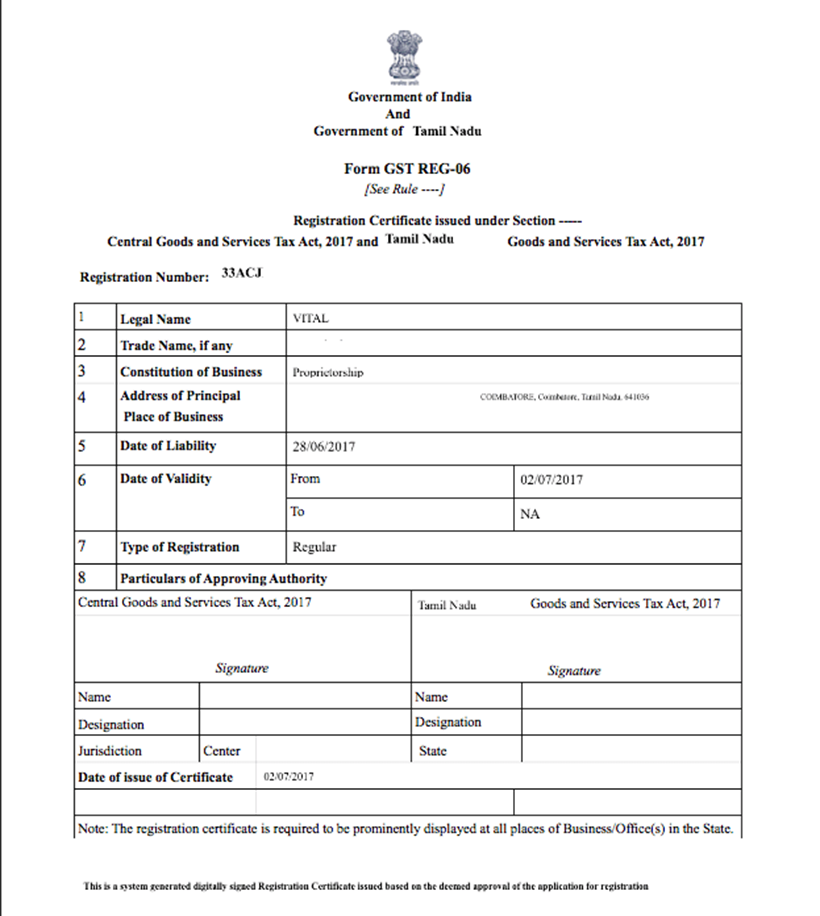
A typical GST REG-06 certificate contains:

  • GSTIN (15-digit registration number) and date of issue.
  • Legal name and trade name (if any).
  • Constitution of business (proprietorship, LLP, company, etc.).
  • Principal place of business and any additional places of business.
  • Names and details of partners/designated persons, wherever applicable.
  • Date of liability and the period of validity (if applicable). Fiscal Flow Website

This information is authoritative for all GST-related activities such as invoicing, filing returns, and compliance checks.


How to Download Form GST REG-06?

  • Go to www.gst.gov.in and log in with your credentials.
  • Navigate to Services → User Services → View/Download Certificates.
  • Find Form No. GST REG-06 in the list and click the download icon. The certificate opens as a digitally signed PDF you can save for your records.

What is the Validity of GST REG-06?

The validity os GST REG-06 form is as follows:

  • Regular taxpayers: Registration is generally valid until it is cancelled, either voluntarily by the taxpayer or by the tax authority.
  • Casual taxable persons & non-resident taxable persons: These registrations are time-bound (generally 90 days) and can be extended on application before expiry.

Always check the “Date of Validity” field on your REG-06 — it will show whether your registration is ongoing or time-limited.


Provisions Issuance of GST Registration Certificate in GST REG-06 Form

The rules for issuing the GST registration certificate are outlined in Rule 10 of the Central Goods & Services Tax Rules, 2017. As per this rule:

  • Once a GST registration is approved, the applicant receives a GST registration certificate.
  • This certificate includes the address of the principal place of business, along with any additional places of business declared in the application.
  • The certificate is digitally signed by the authorised GST officer through an electronic verification system, making it valid and legally recognised.

Inclusions in GST Registration Certificate Form GST REG-06

Parts of the GST registration certificate Components of each part of the GST registration certificate
Registration Certificate
  • Registration Number
  • Legal Name
  • Trade Name (if any)
  • Constitution of the business
  • Address of the Principal Place of Business
  • Date of liability
  • Period of Validity (Notably, the same is applicable only in case of registration of a casual taxable person or non-resident)
  • Type of registration
  • Particulars of the Approving Authority
  • Date of issue of Certificate
Annexure- A
  • GSTIN
  • Legal Name
  • Trade Name (if any)
  • Details of Additional Places of Business
Annexure- B
  • GSTIN
  • Legal Name
  • Trade Name (if any)
  • Following details of proprietor, partners, Karta, managing and whole-time director, the board of trustees, etc.
  • Photo
  • Name
  • Designation/ Status
  • A resident of State

GST REG-06 Sample Format

GST REG-06 Sample Format

Need help with GST registration, GST filing or GST notice assistance? Get in touch with GST experts who can help you everything related to GST right from registration, to filing to resolving notices. Get in touch with Tax2win GST Experts!


Frequently Asked Questions (FAQs)

Q- What is GST REG-06?

GST REG-06 is the system-generated registration certificate issued when your GST application is approved. It proves you are a registered taxpayer and includes your GSTIN and business details.


Q- How do I download Form GST REG-06?

Log in to the GST portal → Services → User Services → View/Download Certificates → click the download icon for Form No. GST REG-06.


Q- Is the GST REG-06 certificate sent by post?

No. The certificate is available only on the GST portal as a digitally signed PDF. The government does not send a physical certificate.


Q- Does REG-06 ever expire?

For regular taxpayers registration remains valid until cancelled. Casual or non-resident registrations are typically time-bound (commonly 90 days) and can be extended.


Q- What details should I verify on my REG-06?

Verify GSTIN, legal/trade name, business constitution, principal/additional addresses, and the date of liability/validity.


Q- Can I add additional places of business to REG-06?

Yes — declare additional places on the portal; the certificate will reflect these in the REG-06 format.


Q- How do I prove REG-06 authenticity to banks or marketplaces?

Share the downloaded digitally signed PDF. The digital signature and portal download path confirm authenticity. IGR Maharashtra


Q- What happens if my registration is cancelled?

You lose the right to collect GST and claim ITC. You may apply for revocation of cancellation if permitted under GST rules.


Q- Where in REG-06 is my date of liability shown?

The certificate displays the “Date of Liability” field — the date from which you became liable to register under GST.


Q- Can I print REG-06 and display it at my shop?

Yes — while the official certificate is digital, you can print and display it at your principal place of business as proof of registration.


CA Abhishek Soni

CA Abhishek Soni
Founder & CEO at Tax2win

Abhishek Soni is a Chartered Accountant by profession and an entrepreneur by passion. He has wide industry experience in telecom, retail, manufacturing, and entertainment and has handled various national and international assignments. He is the co-founder and CEO of Tax2win.in. Tax2win, an online tax filing platform, provides the easiest way to e-file your Income Tax Return in India. Through Tax2win.in, Abhishek endeavors to revolutionize how individuals file their income tax returns, offering a seamless and user-friendly experience.