


- Form 16: Meaning, Download & Importance for ITR Filing
- Form 26QB: TDS on Purchase of Immovable Property
- Form 26AS - View And Download Form 26AS Online
- Form 15G, Form 15H to Save TDS on Interest Income
- Form 10-IE: Opting for the New Income Tax Regime
- Form 27Q - TDS Return for NRI Payments, Due Dates
- What is Form 16B? - TDS Certificate for Sale of Property
- Form 16A: How to Get and Fill Form 16A?
- Form 13 for TDS: Lower or Nil Deduction Certificate Explained
- Form 16 Password - What is the Password for TDS Form 16 and How to Open Form 16 Password?
- Form 24Q: TDS Return on Salary Payment

Form 16 vs Form 26AS: How to Spot and Fix Mismatch Before Filing Your Tax Return
Form 16 is a statement issued by the employer to the employee and consists of details regarding the employee’s TDS. Whereas Form 26AS is issued by the Income Tax Department. It provides details of the taxpayer’s TDS deducted at multiple sources, advance tax payments, and TCS collected by different collectors. All the information present in Form 16 is also available in Form 26AS. However, due to a small error or omission, there can be a mismatch between the two. This guide will help you understand the reasons for TDS mismatches and how to resolve them.
What is Form 16 and Form 26AS?
Form 16
Form 16 is issued under section 203 of the Income Tax Act. It is a TDS certificate issued by the employer to the employee as proof of deducting TDS from their salary. This form contains the PAN and TAN details of the employee. It also provides the salary breakup, exempted allowances, and deductions.
Form 26AS
Form 26AS is a statement issued by the Income Tax Department containing all the information about the TDS deducted and the TCS collected. It also includes the data about the tax credit and income sources. This statement allows the Income Tax Authorities to monitor the transactions that are linked to the assessee’s PAN details.
What is the Difference Between Form 16 and Form 26AS?
While Form 16 and Form 26AS are both TDS statements, there is a notable difference between both. The table below lists the major differences between Form 16 and Form 26AS -
| Parameters | Form 16 | Form 26AS |
|---|---|---|
| Nature | It is a TDS certificate issued by the employer. | It is a statement of all the TDS and TCS deduction/ collection, tax credit and income sources. |
| Issuer | Issued by an employer | Issued by the Income Tax (IT) Department |
| Issue against | Issued against the employee | Issued against the taxpayer |
| Frequency of issue | Issued annually | The frequency of the issue is not fixed. It is updated periodically. |
| Purpose | It is a TDS certificate issued by the employer to the employee, consisting of the details of TDS deducted by the employer. | It is a statement issued by the Income Tax Department that provides details of the taxpayer's TDS/ TCS payments to multiple deductors and collectors. |
Why is it Important to Rectify Mismatches?
- If your TDS or Form 26AS is not updated, you cannot use the data pre-fill facility. Tax2win’s AI enabled Self filing software pre-fills most of the data using the Taxpayer’s PAN details, thus reducing manual effort. In order to use this facility, it is important to update your Form 26AS.
- If there is a mismatch in Form 16 and Form 26AS, the Income Tax return will be rejected. The taxpayers will be required to respond to the Income Tax notice online and explain the reasons.
- It may also result in a delay in the processing of returns and tax refunds. Therefore, rectifying the mismatches can help taxpayers file their ITR without any hassle.
- If the TDS already deducted is not reflected in your Form 26AS, then the TDS refund might not be processed.
What are the Reasons for Mismatches Between TDS Statement and Form 26AS?
There are various reasons for a mismatch between the Form 26AS and Form 16. Given below are some common reasons for a mismatch in the TDS statement and Form 16 -
- When the deductor fails to deposit TDS on time
- If an incorrect amount is entered in the TDS return
- If the Incorrect PAN is quoted in the TDS return
- When there is a mistake in the CIN (Challan identification number)
- When the PAN/TAN of the deductor is entered wrongly
- When there is a mistake in the chosen Assessment year
- Omissions in the TDS return
- Incomplete details of the assessee in the TDS return
- Mismatch in the TDS entered and the actual TDS deducted
How to Resolve TDS Mismatch?
Once you have identified the error after comparing the forms, you must do the following to resolve the mismatch -
- Inform the person responsible for deducting TDS from your income, i.e, the employer or the deductor of TDS.
- If the mismatch is due to an error made by your employer, it will be easier for them to correct it. Therefore, you must connect with your employer if you find any such mismatch.
- The employer must file a revised TDS return. Make sure the details are correct in the revised TDS return.
- If you have received a notice from the Income Tax Department about the tax credit mismatch, you can respond to it online through the income tax e-filing portal by mentioning the reason for such a mismatch.
What Happens if You Don’t Resolve the Form 16 and Form 26AS Mismatch?
If the taxpayer’s TDS is deducted and the assessee doesn’t receive an equivalent tax credit, he must make sure that the credit is reflected in Form 26AS. Even if the taxpayer has filed a tax credit in the ITR, they cannot claim a tax refund if it is not reflected in Form 26AS.
The Income Tax department can also issue a demand notice for underpaying taxes. If the taxpayer doesn’t fix the differences between Form 26AS and Form 16. The IT department issues a defective return notice under the Income Tax Act. The taxpayer can respond to this notice on the e-filing portal.
With the ITR filing for FY 2024-25 underway, and people rushing to file their ITR, it is also important to ensure that you file it accurately to avoid any notices and penalties. If you are someone who finds taxes complicated, simply get in touch with our experts, who can help you file your ITR accurately and maximize your TDS refund. Book an eCA now!
You can also file your ITR yourself with Tax2win’s AI integrated platform in just 4 minutes. Our AI enabled platform pre-fills most of your data, automatically computes the deductions, and provides computation under both regimes so that you can choose the most beneficial one. File your ITR today and claim your TDS refund faster. File ITR Now!
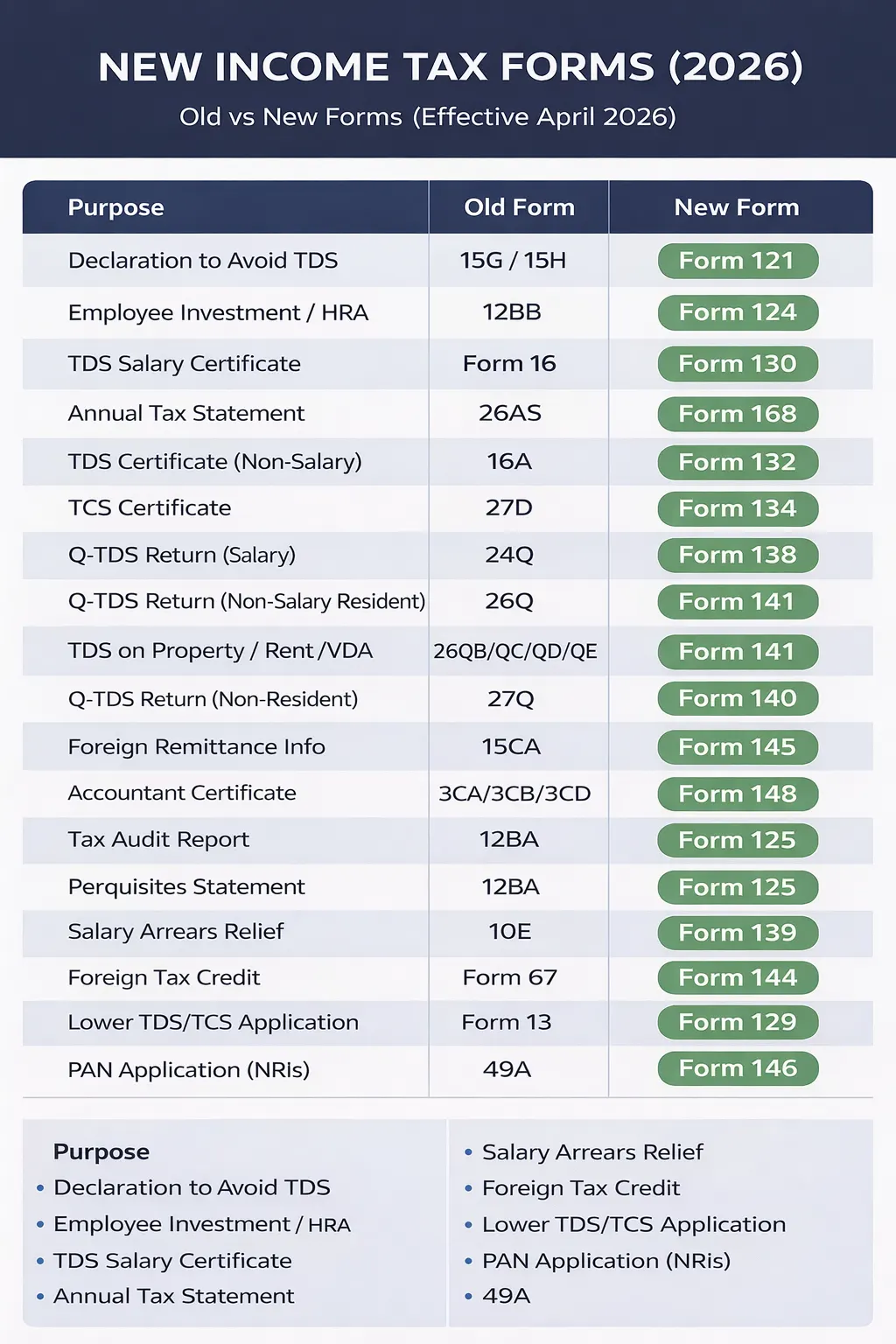
New Income Tax Forms (Effective April 2026)
Frequently Asked Questions
Q- Are Form 16 and Form 26AS the same?
Form 16 and Form 26AS are not the same. While Form 16 is a document issued by the employer that consists of the TDS deducted from salary, Form 26AS is the TDS statement issued by the Income Tax Department, containing the TDS and TCS amounts.
Q- Should Form 16 and Form 26AS match?
Yes, both Form 16 and Form 26AS should match so that the taxpayer can claim TDS and TCS refund from the Income Tax Department. It will also prevent the taxpayer from receiving a defective return notice.
Q- What if Form 16 and Form 26AS are not matching?
If Form 16 and Form 26As do not match, the taxpayer should first identify the error and figure out whether it is because of any wrong details entered by the employer. If the error is from the employer’s end, he should reach out to them and ask them to file a revised TDS return.
Q- What is the purpose of Form 26AS?
Form 26AS is a statement issued by the Income Tax Department, reflecting the TDS/TCS amount deducted/collected by the taxpayer by multiple deductors and collectors.
Q- How will I know if there is a tax credit mismatch in the ITR?
If there is a mismatch in TDS between both forms, you will receive a defective notice. This notice will have the option to correct the TDS details. In case of a TDS mismatch, you will be served a defective notice. You can correct the TDS details either online or offline.
Q- What to do if Form 26AS is not updated?
The deductor is responsible for updating your Form 26AS with all the deductions. If any details are missing, inform the deductor and ask them to make the necessary corrections promptly. Only the deductor can update your Form 26AS.
Q- What is the time limit for rectification of TDS returns?
You can rectify mistakes in the TDS return within 6 years from the end of the relevant financial year.